


Rental icome management isn’t truly passive if you’re stuck chasing payments and sorting through transactions to see who’s late. Whether you’re managing one unit or a hundred, having a solid rent tracking system will help you save time and stay compliant.
In this guide, we’ll cover top methods, platforms, and tips to track rental income, manage rental property expenses, and streamline your real estate income statement.
Key takeaways
- Rental income tracking is essential for accuracy, compliance, and understanding actual property performance.
- You can track rental income in multiple ways, including spreadsheets, accounting software, rent collection apps, and dedicated fintech platforms.
- Spreadsheets and general accounting tools work for new landlords, but they require manual entry and don’t scale well for multi-property portfolios.
- Dedicated rental management platforms offer the most automation, combining rent collection, bookkeeping, and reporting to reduce errors and save time.
- Baselane stands out as the most complete solution, with automated rent collection, integrated banking, and tax-ready reporting that makes income tracking effortless.
Different methods to keep track of rental income
There are several ways you can organize rental tracking, depending on the size of your portfolio and how automated you want the process to be.
Here are the most common methods:
- Spreadsheets (Excel or Google Sheets): Spreadsheets are free, flexible, and easy to customize, making them ideal for beginners or landlords with a single property. However, manual entry is prone to errors and doesn’t scale well as your portfolio grows.
- Accounting software: General accounting tools like QuickBooks and Xero support income and expense tracking, invoicing, and reporting, but they aren’t built for rental properties. So, you’ll need to customize accounts, manually categorize transactions, and use workarounds for Schedule E reporting.
- Rent collection apps: Apps that focus primarily on rent collection—like PayYourRent, Cozy—allow tenants to pay online and generate payment records automatically. They are convenient if you want an easy way to collect rent, but typically don’t integrate expenses by property, requiring a separate bookkeeping solution for taxes and reporting.
- Fintech platforms for real-estate investors: Fintech platforms built for real estate, such as Baselane, go beyond rent collection. They combine banking, accounting, and property management in a single system:
- Automate rent collection and late fees
- Track income and expenses by property
- Generate cash flow and financial reports
- Simplify tax preparation and Schedule E reporting
- Offer shared access for property managers to handle the financial side directly
These platforms are ideal for landlords who want automation, real-time visibility, and the ability to scale without adding manual work.
Why dedicated landlord platforms are the best way to track rental income
Accurate rental income tracking is essential for running a profitable rental business. Modern financial management platforms for landlords automate much of the work, reduce errors, and give you a clear view of your properties’ financial performance.
- Track taxes easily: Platforms automatically record rent, fees, and expenses, and generate tax-ready reports. This simplifies Schedule E preparation and ensures you capture all deductions while avoiding IRS penalties.
- Organize records automatically: Keep leases, payment histories, security deposits, and receipts organized in one place.
- Monitor cash flow clearly: Get real-time insight into your rental property expenses and income. Identify which properties are profitable, plan for repairs, and make smarter investment decisions without guessing.
- Separate finances efficiently: Dedicated platforms help you keep personal and rental finances separate, streamline bookkeeping, and track cash flow. Built-in banking features make it easy to manage multiple properties from one dashboard.
Top 5 rental income tracking software in 2026
Baselane
When it comes to the best rental records tracking software, Baselane stands out as an all-in-one solution for landlords and real estate investors. It combines banking and bookkeeping with rent collection, which means you keep tabs on incoming rent payments across properties.
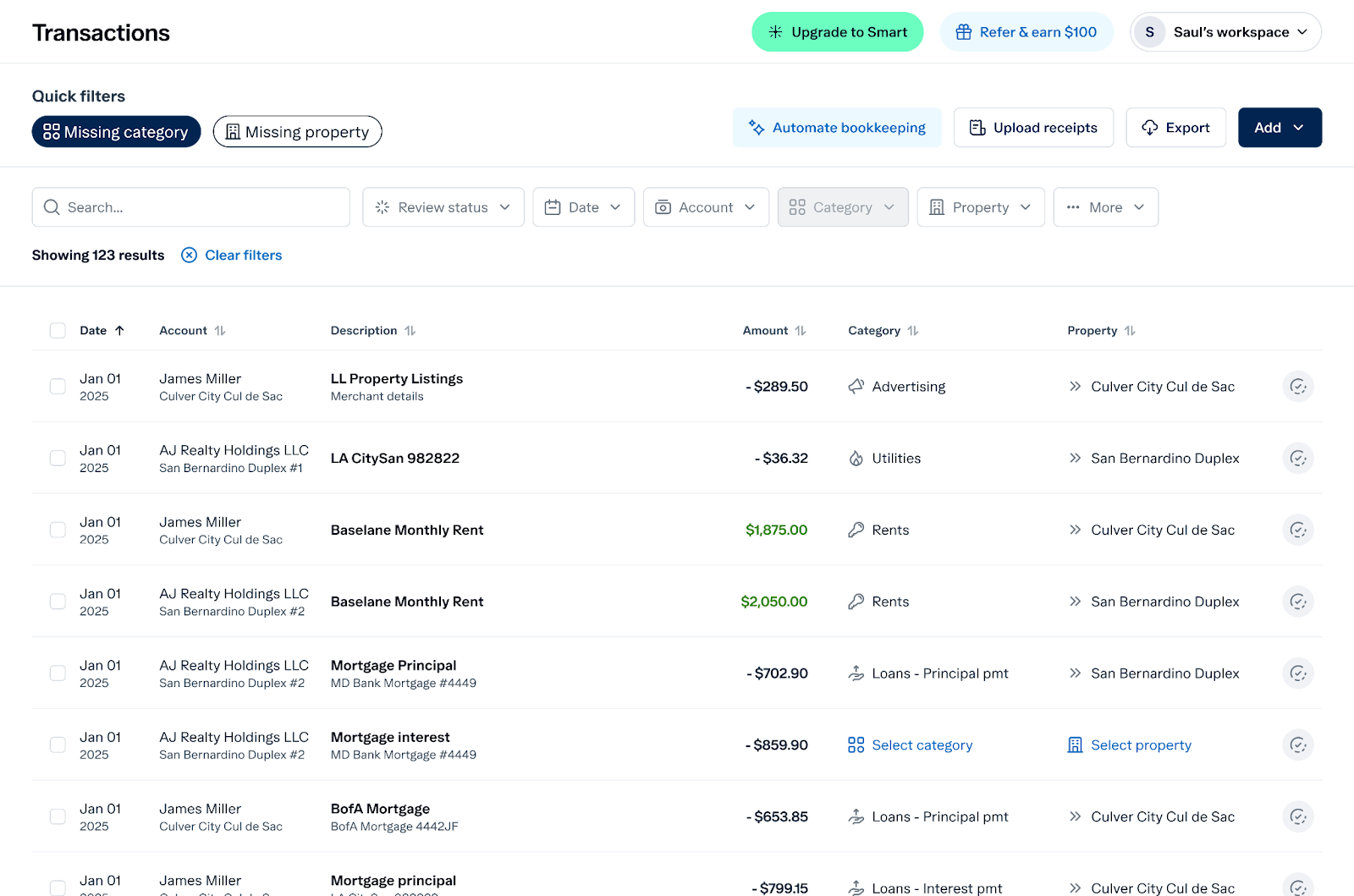
Unlike QuickBooks or spreadsheets, where you track income manually, Baselane automates the process. Not only can you automate rent collection, but with automated bookkeeping, you can also auto-tag transactions by property and Schedule E category, and generate tax-ready reports.
Baselane key features
- Free, automated rent collection with late fee management
- Auto-generate tracking reports, including rent roll, rent ledger, and cash flow statement
- Integrated banking with unlimited checking and savings, a property-specific account
- Built-in bookkeeping with auto-tagged transactions by property and Schedule E category
Baselane pricing
- Free plan: Offers core tools you need to manage your rental properties—banking, bookkeeping, and rent collection at no cost.
- Baselane Smart: $20/mo, with advanced auto-tagging, auto-receipt match, automated transfers, 2-day rent deposits, shared access, and custom expense and income categories.
Own your time,
not just your properties
Make your finances work harder, so you don’t have to.


Stessa
Stessa offers basic rental income tracking and ACH rent collection, but has notable limitations. While Stessa offers a free plan and a $28/month Pro upgrade, it lacks debit or credit card payment options and has ACH limits as low as $6,000, which may cause cash flow issues for larger portfolios.

Stessa key features
- Automated rental income reporting
- Generates financial reports for tax filing
- Tracks multiple properties
Stessa pricing
- Free plan: For up to 1 portfolio management
- Paid plan: Starts at $12 per month
Rentec Direct
Rentec Direct’s rental revenue management tools are best for landlords and property managers with mid-sized to large portfolios. The platform includes features like rent tracking, tax reporting, lease management, and tenant screening. Pricing starts at $45/month for the Pro plan, with additional costs for certain integrations. Some advanced tools may require third-party add-ons, which can increase overall expenses.
Rentec Direct key features
- Tracks rental payments and expenses with native accounting
- Built-in rent reporting to see rent collected across properties
- Tenant screening and online rent collection
Rentec Direct pricing
- Free plan: None, 14-day free trial only
- Paid plan: Starts at $45 per month for 1 unit.
Buildium
Buildium is property management software that supports enterprise-level tracking of rental income. It offers tools for accounting, tenant screening, maintenance management, and automated rent collection. Some downsides include high unit-based pricing, additional fees for certain features and onboarding, and a learning curve that may not be worth it for managing a few properties.

Buildium key features
- Cloud-based rental earnings tracking
- Automated bookkeeping features
- Integration with QuickBooks
Buildium pricing
- Free plan: None, 14-day trial only
- Paid plan: Starts at $62 per month and increases based on the number of units.
AppFolio
AppFolio provides rental income tracking primarily for mid to large-sized portfolios, including rent collection, leasing, maintenance, marketing, and financial reporting tools. It’s important to note that some advanced tools are only available on higher-tier plans, and the platform can take time to master fully.

AppFolio key features
- Supports landlords managing multiple properties
- Automated tenant payment tracking
- Includes expense and maintenance tracking
AppFolio pricing
AppFolio pricing is custom-based on the number of units you manage. There’s also a minimum monthly spend that usually requires 50+ units.
To maximize returns, investors often look into how to pay no taxes on rental income, choose the best bank for real estate investors, and fully understand the rental property mortgage interest deduction.
How to track rental income with Baselane
Tracking rental income in Baselane is mostly about setting things up once, then letting the system do the heavy lifting month after month. This walkthrough keeps things simple and focused on what you actually need to do as a landlord.
Baselane pulls in money movement from your bank and rent payments, then lets you label what is “rent income” and what belongs to each property and unit. Once that is in place, Baselane shows reports for cash flow, taxes, and rent payments without you building your own spreadsheet every month.
Step 1: Set up your properties
Start by adding each rental property into Baselane with its basic details (address, units, etc.). Treat each property as its own “bucket,” so later you can see income per property instead of a messy pile of transactions.
- Add every active rental property, even if it is currently vacant.
- If you have multi‑unit buildings, add each unit so you can tie income to the correct tenant.
Step 2: Turn on rent collection
Next, set up an online rent collection so Baselane can record payments automatically when tenants pay.
- Create a rent schedule for each tenant with the monthly amount, due date, and any fees (parking, pet, etc.).
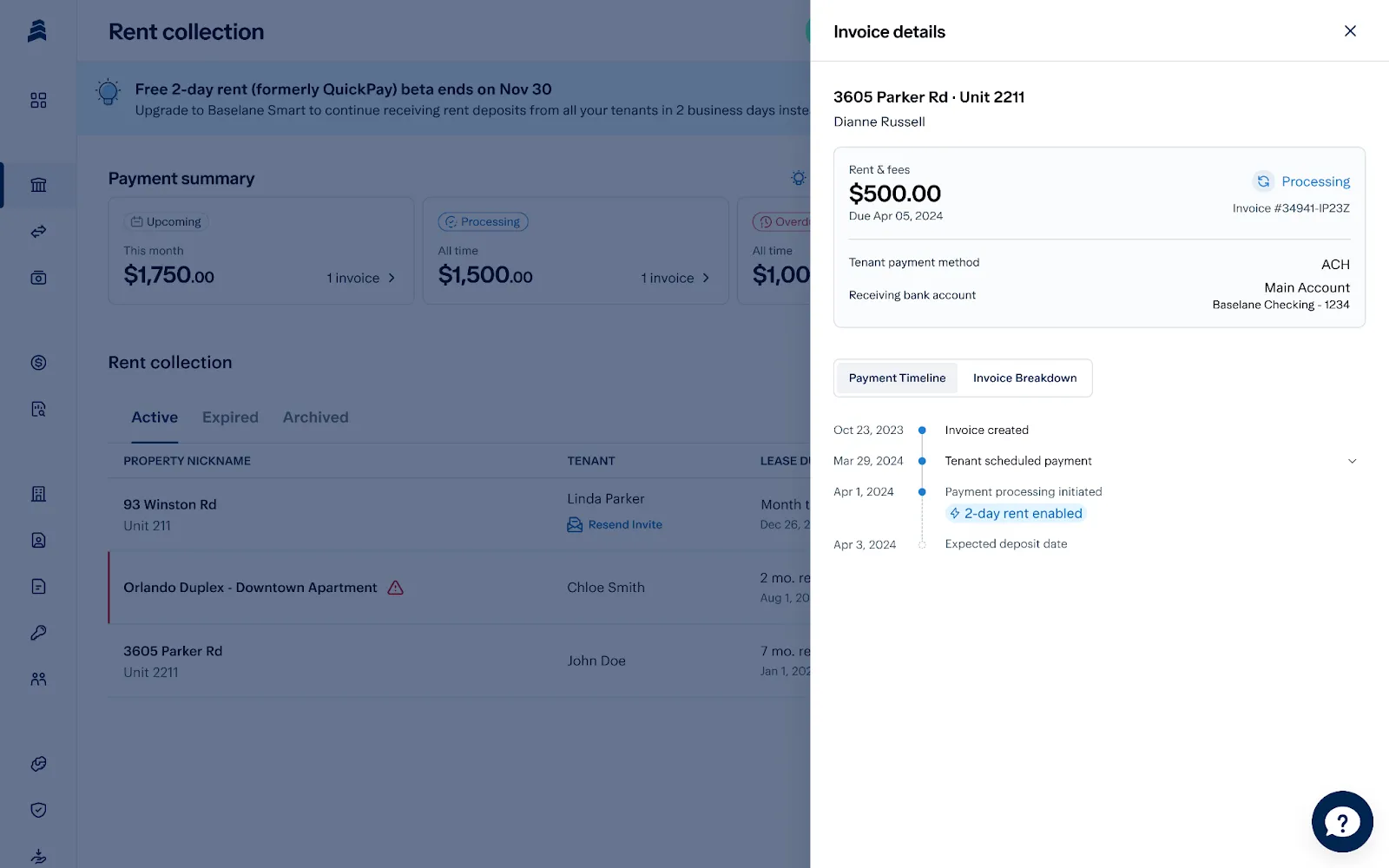
- Share the payment link or invite with your tenants so they can pay by bank or card through Baselane.
When tenants pay online, Baselane will log those payments against the right tenant and property without any extra work from you.
Step 3: Connect banking so deposits show up
To see the full picture of your rental cash flow, connect the bank accounts where rent is deposited and expenses are paid.
- Link your rental bank account and any card you use for rental expenses so those transactions flow into Baselane.
- If you use Baselane’s own landlord banking, rent collected will be deposited directly into accounts already tied to your properties. This keeps income and expenses synced and reduces manual typing and copy‑pasting between systems.
You can set up multiple bank accounts in Baselane for each property to separate rental income and organize at the property and unit level.
Step 4: Record cash or offline rent
If a tenant pays by cash, check, or money order, you can still keep those records in Baselane. Deposit the cash or check into your rental bank account (or a Baselane banking account if you use it). In the rent dashboard, mark that month’s invoice as paid so the tenant’s ledger shows the payment.
If the payment does not appear automatically as a transaction, you can add a manual transaction and tag it as “Rent Income” for the right property and tenant.
Step 5: Tag income correctly
Once transactions are flowing in, make sure each rent payment is properly labeled so reports stay clean.
- Set the category to “Rent Income” (or similar) so the system knows this is revenue, not a refund or fee.
- Attach each income item to the correct property (or set auto-tagging rules to automate this) and unit to see which rentals are performing well.
Step 6: Track rent by tenant with ledgers
Baselane keeps a running “ledger” for each tenant that shows what was billed and what was paid.
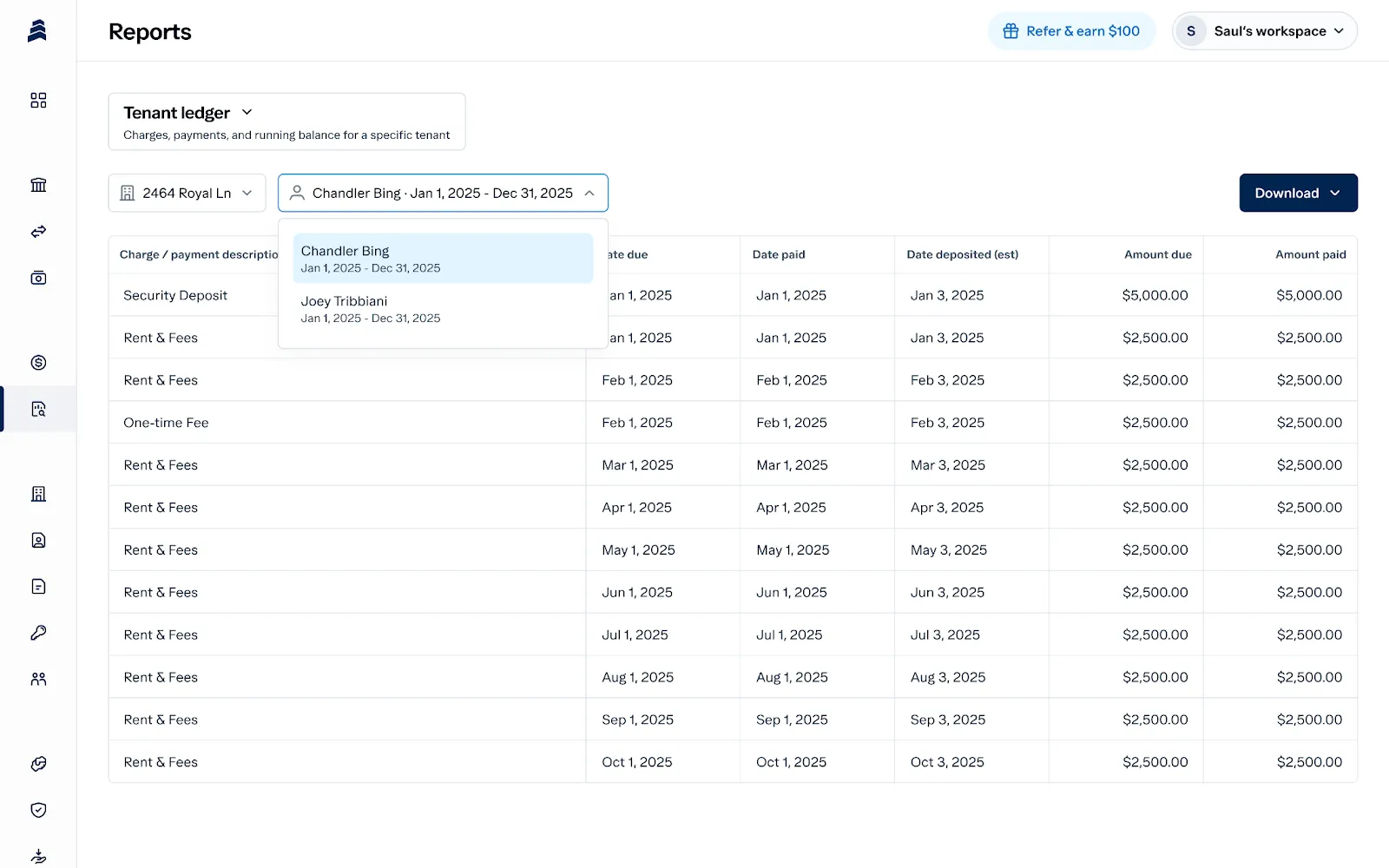
Open the tenant or lease view to see invoices (rent charges) and payments over time. Use this to spot missed or partial payments and to confirm balances before sending reminders or notices. This replaces ad‑hoc notes and scattered spreadsheets with one clear history per tenant.
Step 7: Use reports to review income
Once your income is tagged and tied to properties, use the analytics dashboard to get a 360-degree view of your rental cash flow.
Open cash flow or Schedule E style views to see total rent income, other fees, and net cash for a chosen date range. Filter by property or portfolio to see which rentals bring in the most cash and which may need rent increases or expense cuts.
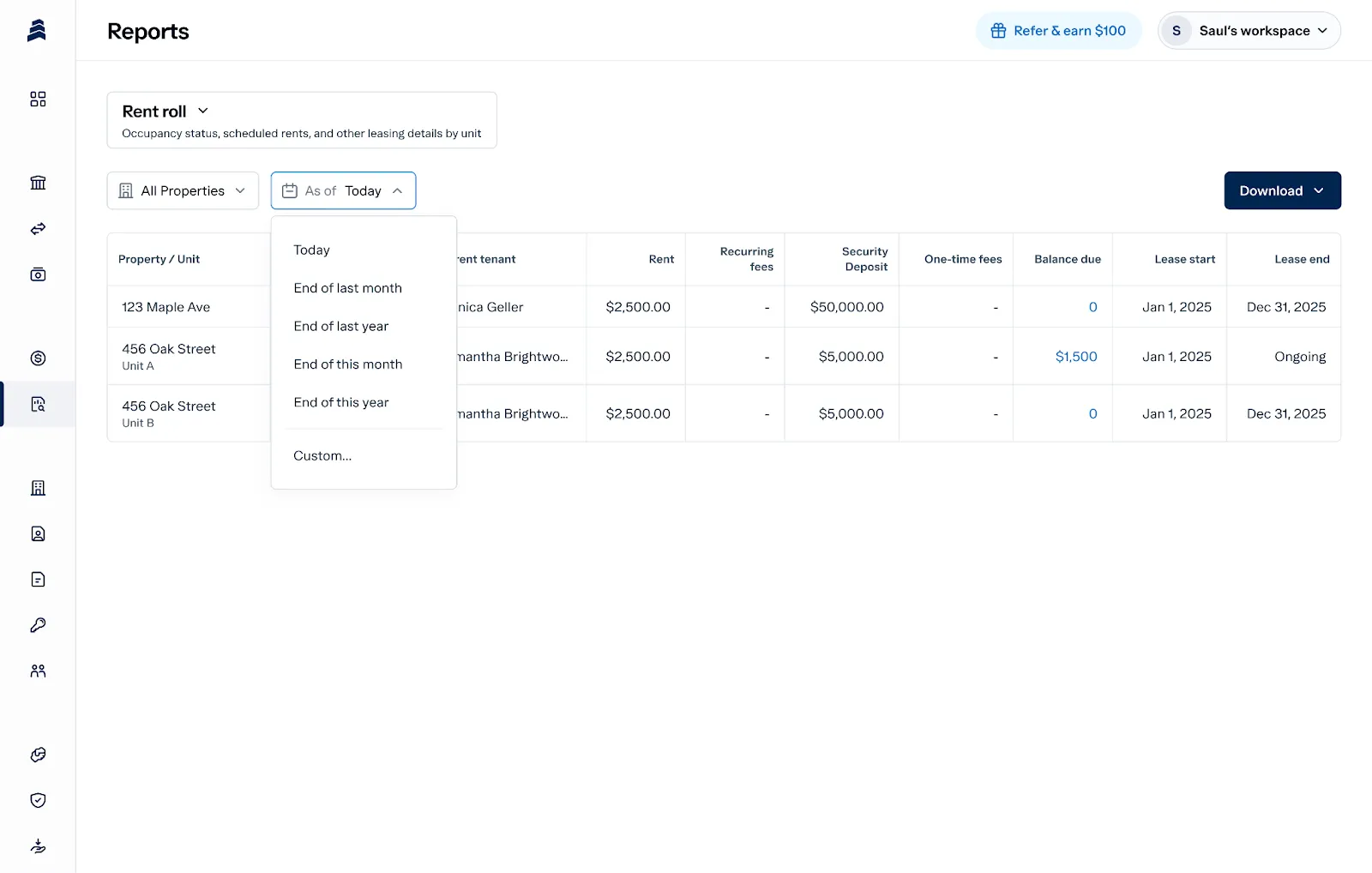
These views are especially useful at tax time, when you or your CPA need totals by category and property.
Start tracking rental income with Baselane
Traditional banks come with a laundry list of account fees, balance requirements, and transaction limits. These charges might seem small at first, but over time, they eat into your cash flow and ROI.
With Baselane, you can connect all your external bank accounts and open unlimited free sub-accounts for multiple entities without monthly fees or minimum balance requirements. Plus, rent collection and bookkeeping are all built in and fully automated, so you can manage your finances without logging into multiple platforms.
Ready to simplify how you manage rental income? Open a free Baselane account today.



FAQs
How do I keep track of my rental income?
You can track rental income using a spreadsheet, general accounting software, or a dedicated all-in-one platform. While spreadsheets and basic tools can work for small portfolios, an all-in-one solution like Baselane is the best option for staying organized, simplifying taxes, and supporting long-term real estate passive income growth.
What is the best app to keep track of rental income?
Baselane is one of the best platforms for tracking rental income. It automates rent collection, tags transactions by property and category, and provides real-time cash flow insights, all with no monthly fees. You can manage your entire portfolio from one dashboard, making it easy to stay organized, save time, and keep your finances tax-ready.
What is the best rental income tracking software?
The best rental income tracking software depends on your portfolio size, the level of automation you want, and whether you need integrated banking and bookkeeping. Baselane offers a complete rental income tracking solution tailored to landlords and real estate investors. You can track income and expenses automatically, generate financial reports, and even separate finances by property with unlimited virtual accounts. Everything from rent collection to tax prep is built in. It’s a smart, hassle-free way to manage your rental business.
Can I track rental income with QuickBooks or Excel?
Yes, you can use QuickBooks or Excel to track rental income, but it requires more manual effort and customization. Baselane simplifies things by doing the heavy lifting, auto-tagging expenses, collecting rent, and generating reports for you.
How does rent tracking work for multiple properties?
The best way to manage rental income across multiple properties depends on how many units you have and how much automation and reporting you need. Baselane makes it easy to manage multiple properties by letting you open unlimited virtual accounts, one for each property.
This keeps your income and expenses organized and makes it simple to run reports by unit. You’ll always know how each property is performing. Plus, it’s one of the best bank accounts for rental property owners thanks to its no-fee structure and high-yield interest.
Does landlord income tracking include security deposits?
Yes, but security deposits should be tracked separately from regular rental income. While they’re not taxed upfront, it’s important to document when they’re collected, where they’re held, and how they’re returned or used. Proper tracking ensures compliance with state laws and simplifies bookkeeping.

.jpg)