



Airbnb, Vrbo, and other vacation rental sites might track your bookings, but what about those everyday costs that chip away at your profits? Without a clear picture of your finances, it's easy to overspend, lose track of deductions, and ultimately miss out on maximizing your rental income.
This guide explores the common financial challenges of managing short-term rentals and shows you how Baselane simplifies expense tracking, saving you time and putting you back in control of your cash flow.
Key takeaways
- Many Airbnb hosts miss out on deductions by mixing personal and business expenses, overlooking small costs, or relying on manual tracking.
- Hosts should account for all Airbnb expenses, including cleaning services, maintenance, utilities, insurance, property management, and marketing costs.
- Using dedicated banking accounts for Airbnb income and expenses makes it easier to manage cash flow and simplifies tax reporting.
- Automate your bookkeeping, manage operating expenses with virtual cards and accounts, and analyze your cash flow with Baselane.
- Regularly reviewing cash flow and expense reports helps hosts make informed decisions about pricing, budgeting and future investments.
6 common Airbnb expense tracking mistakes to avoid
Even the most organized hosts can fall prey to these common pitfalls when managing Airbnb finances, which is why using property management software for Airbnb can make a big difference.
- No business banking account: Mixing personal and business finances makes it nearly impossible to accurately track your short-term rental profits.
- Multiple accounts and tools: Tracking your cash flow in 10+ different places is a recipe for confusion, errors, and wasted time.
- Manual bookkeeping: Relying on an Airbnb expenses spreadsheet for tracking can lead to costly mistakes and missing out on tax deductions.
- Overlooking minor expenses: Those little expenses – cleaning supplies, light bulbs, batteries – add up over time. Not accounting for them creates an inaccurate picture of your true costs.
- Missed deductions: Many hosts are unaware of all the potential Airbnb tax write-offs available. Failing to claim eligible expenses can significantly reduce your profits.
- Limited financial insights: Without proper tracking and reporting, it's difficult to analyze your performance, identify areas for improvement, and make informed decisions about pricing and investments.
Airbnb expenses list for short-term rental deductions
There's a whole world of rental property expenses that can easily slip through the cracks if you're not careful. Here's a breakdown of common Airbnb deductible expenses, including some that often get overlooked:
- Advertising and marketing: Listing fees for vacation rental sites, social media campaigns, and other promotional materials.
- Appliance and furniture expenses: Furnishing your rental with beds, sofas, appliances (refrigerator, stove, microwave, etc.), and other essential items.
- Cleaning services: Professional cleaning between guest stays, laundry services, and cleaning supplies.
- Homeowners Association (HOA) fees: If applicable, these recurring fees cover the maintenance and upkeep of common areas and shared amenities in your community, and should be accurately tracked using HOA bookkeeping software to ensure proper budgeting and compliance.
- Household supplies: Essential items like toilet paper, paper towels, hand soap, dish soap, and laundry detergent.
- Insurance premiums: Short-term rental insurance, landlord insurance, plus any additional coverage.
- License and registration fees: The cost of registering your short-term rental business with your city or county.
- Lodging taxes: Occupancy taxes or other local taxes that you may be required to collect and remit to your local government.
- Maintenance and repairs: Regular upkeep, fixing damage, and replacing appliances.
- Mortgage interest: This is the interest portion of your monthly mortgage payments.
- Professional and legal services: Hiring an accountant, lawyer, or other professional services like snow removal and pest control.
- Property management and co-host fees: Services provided by a property manager or co-host to help manage your listing.
- Property taxes: Semi-annual taxes levied on your property's assessed value.
- Service fees: Charges for processing bookings through Online Travel Agencies (OTAs) like Airbnb, Vrbo, and Booking.com.
- Software and subscriptions: Property management software, vacation rental accounting software, Airbnb accounting software, guest communication platforms, streaming service,s and other tools, and any other accounting software for real estate.
- Travel expenses: If you need to travel to your rental property for maintenance, inspections, or other reasons.
- Utilities expenses: Electricity, water, gas, heat, internet, cable, and trash removal.
10 ways to use Baselane to automate short-term rental expense tracking
Baselane offers unlimited checking and savings accounts for all your entities and properties under one login that directly connect to vacation rental platforms to receive payouts.
Here’s how Baselane helps you manage your vacation rental expenses.
1. Open a business checking account
Opening a Baselane banking account for your Airbnb business expenses and income only takes a few minutes. Unlike traditional banks, Baselane lets you open unlimited checking and savings accounts for all your entities and properties — short-term rentals, long-term rentals, and everything in between — under one login. Plus, you can connect vacation rental platforms to receive payments directly into your Baselane account.
How to open a Baselane banking account:
- Sign Up: Create a free Baselane account in just a few minutes.
- Click "Add Account": Open a business checking account as a Sole Proprietor or Business Entity (i.e., LLC).
- Enter Details: Complete the application with your personal or business details.
Once approved, you can start banking and create additional checking accounts for managing day-to-day finances and savings accounts to grow your money with up to [v="apyvalue"] APY².
2. Sync all your rental property transactions
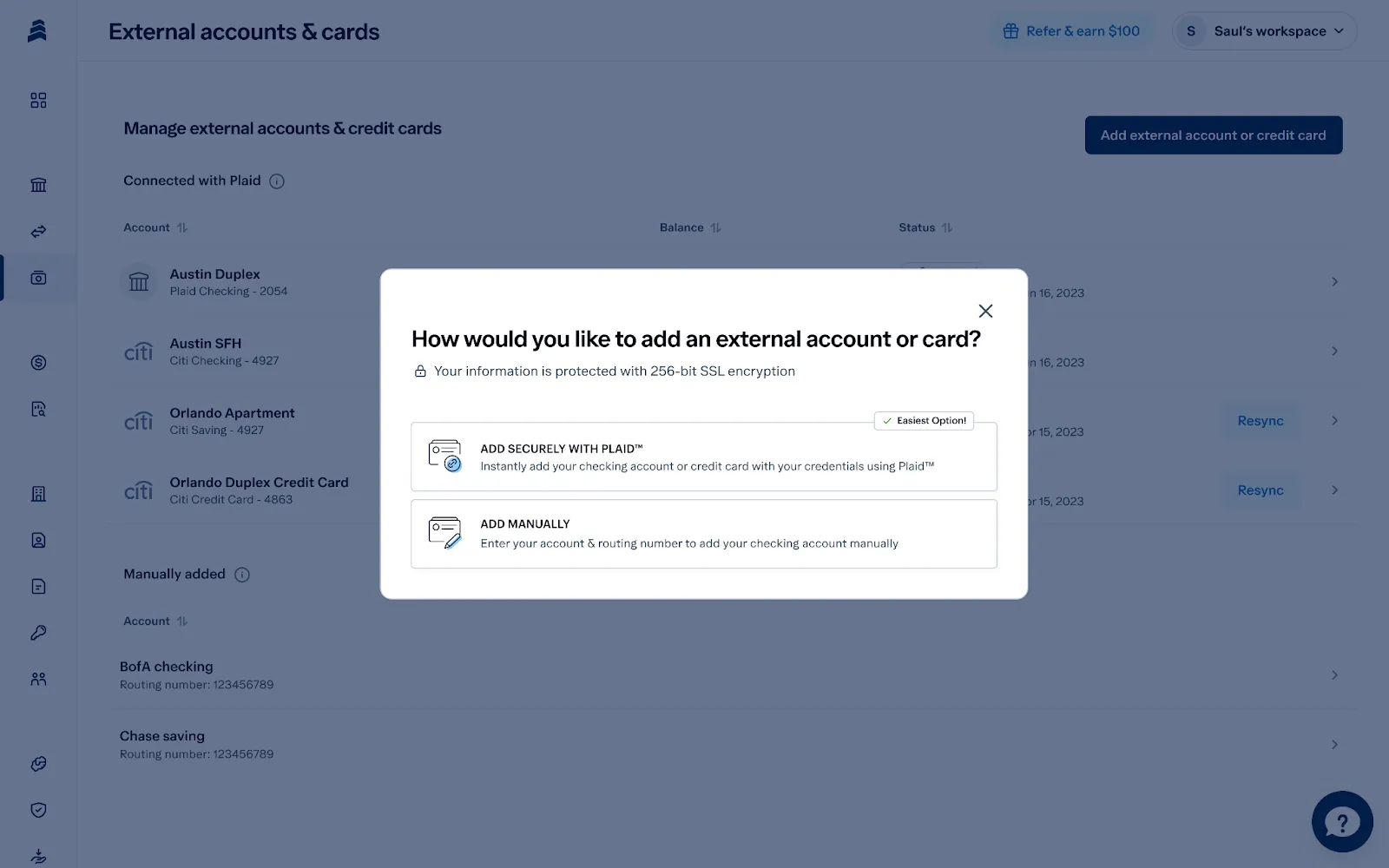
Connect your external bank accounts and credit cards to Baselane for a complete view of your cash flow. Baselane automatically syncs all your transactions into a single, consolidated ledger, making it easier to track Airbnb expenses and prevent deductions from slipping off your radar.
Here’s how to link external accounts to Baselane:
- Click "Add External Account": Connect your account securely using Plaid or add it manually.
- Enter bank details: Add your bank credentials or account information.
- Import transactions: Enable transaction imports and auto-tag them to a specific property.
3. Set up accounts for each property
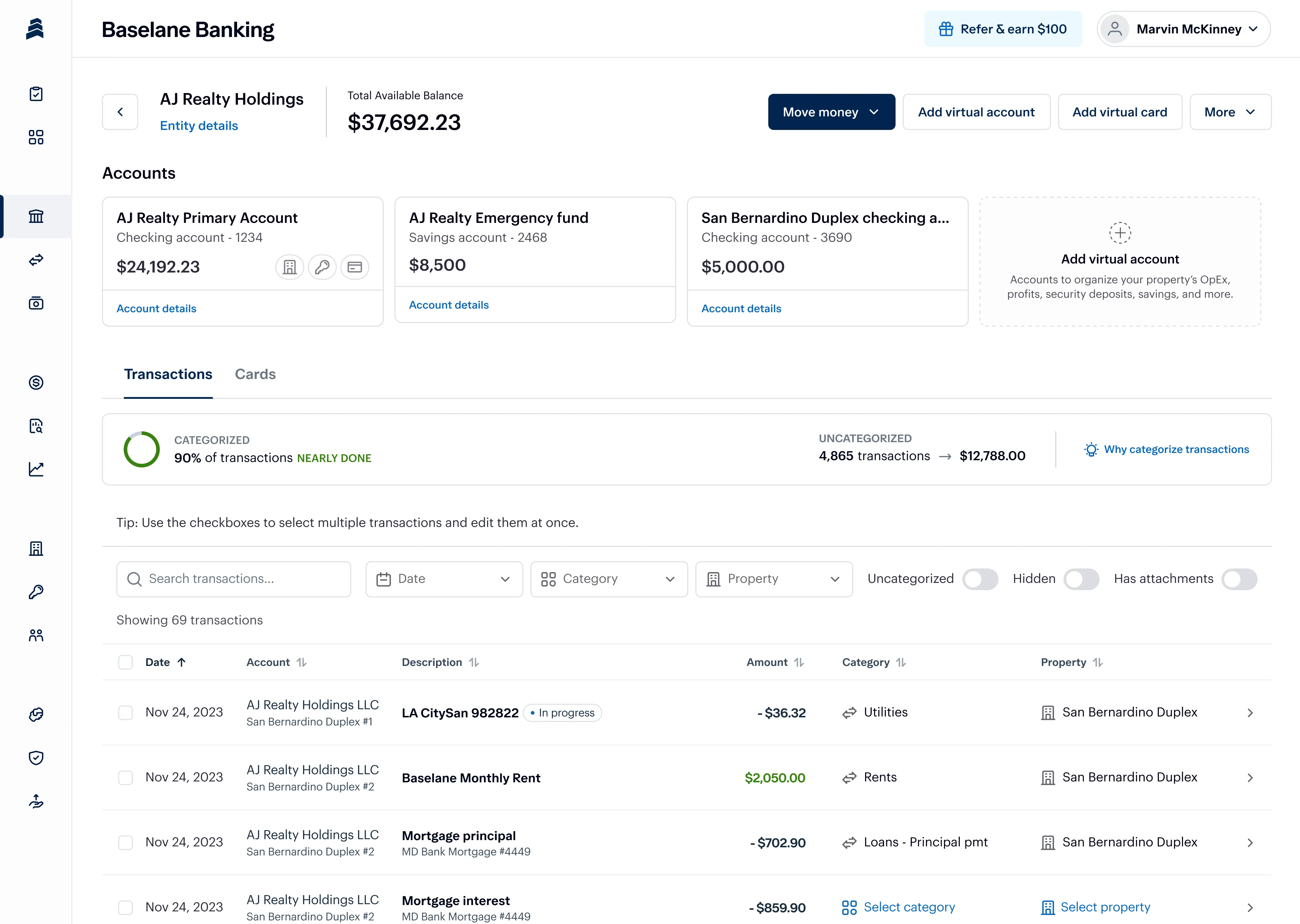
Baselane's property-specific accounts keep everything organized, so you won't waste time sorting through transactions to figure out which expenses belong to which property. You can assign each account to a specific property or listing and create as many virtual accounts as you want for income, capital reserves, and expenses like maintenance, furnishings, upgrades, and general operating costs.
Here’s how to set up property-specific accounts:
- Click "Add Account": Choose a Savings account or a Checking account.
- Name the account: Give it a clear name (e.g., "Airbnb LA").
- Enable auto-tagging: Automatically assign transactions in this account to a specific property or unit (optional).
How to link checking accounts to Airbnb:
- Change payment settings: Click “Payments & Payouts” under Payment Settings.
- Add payout method: Add your Baselane banking accounts as a payout method.
- Connect virtual accounts: Click “Add Routing Rule” under Want to Split Your Payouts? and select a virtual account for each property. Read more about how to split payouts here.
You can also connect Baselane banking accounts as a payout method on VRBO and other vacation rental sites.
4. Use debit cards to manage and control expenses
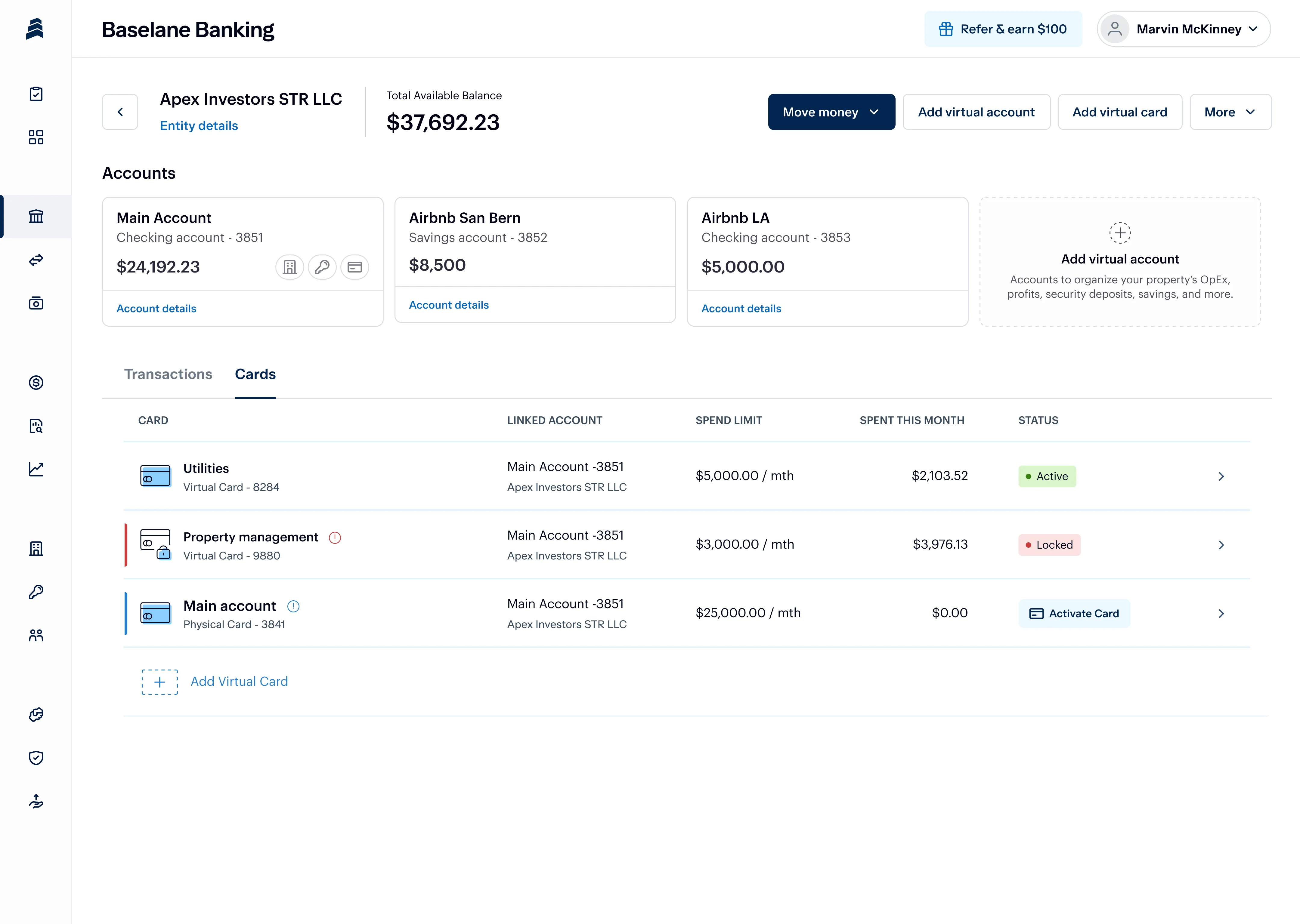
Baselane’s virtual debit cards let you allocate spending to specific properties or expense categories. They work just like physical debit cards, except they're stored on Baselane and in your Apple Pay or Google Pay wallet. You can create separate cards — each with its own unique card number, expiry date, and CVV — for recurring expenses (like utilities and insurance), cleaning, maintenance, supplies, and anything else your rental needs.
Share these cards with your property manager or co-host and set spending limits to stay within budget.
How to create virtual cards:
- Go to "Cards": Find it under Baselane Banking and click "Create Virtual Card".
- Assign an Account: Choose the linked Checking account for your property this card will pull funds from.
- Choose Settings: Set up daily or monthly limits and any auto-tag rules for categorizing transactions.
5. Automatically categorize income and expenses
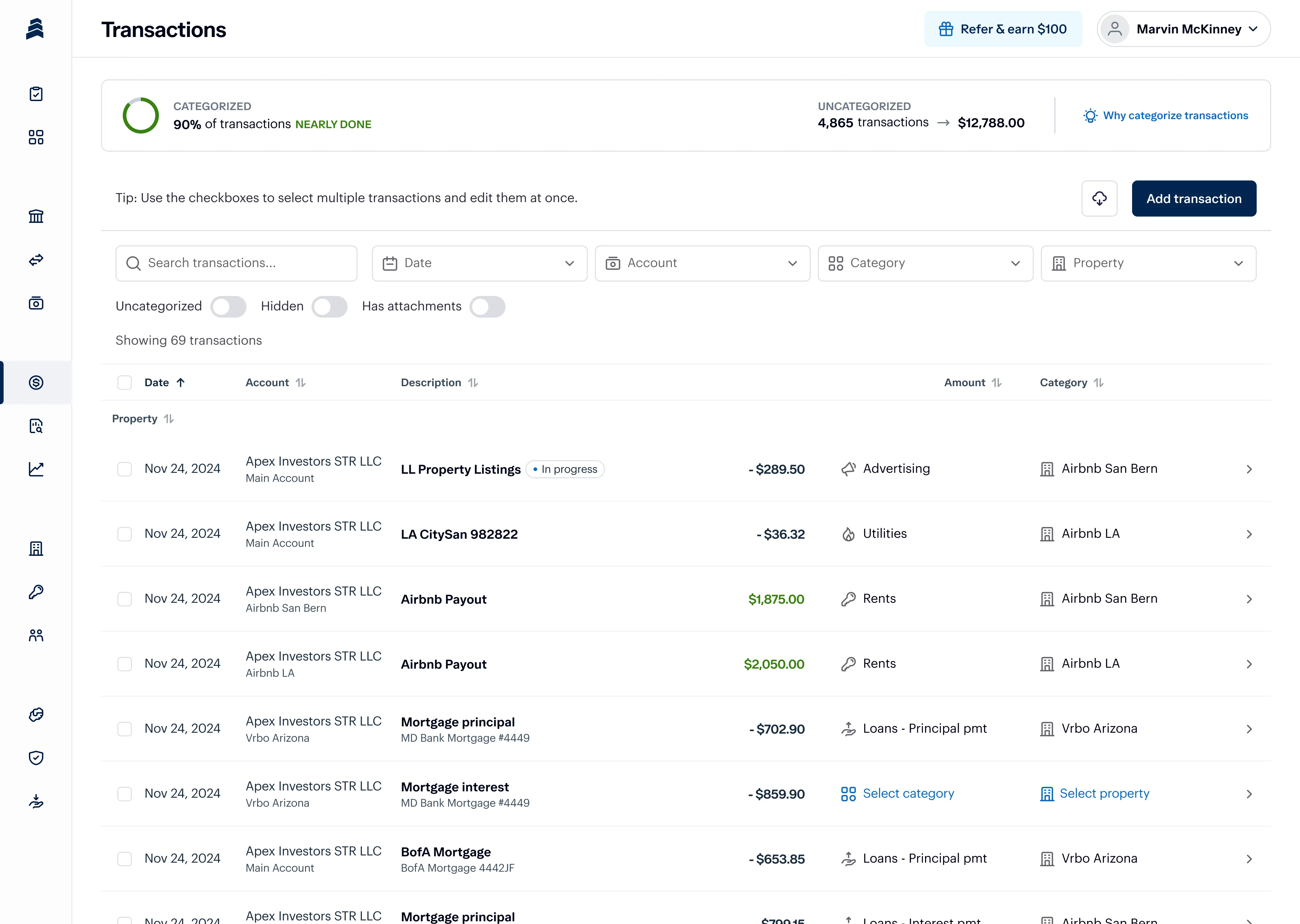
One-click categorization can eliminate all your manual accounting and data entry. Simply set up rules for each virtual card and checking account to automatically categorize transactions by property and Schedule E category. And if you're switching from another bank, no problem! Import your transactions and categorize them in bulk using our extensive list of 120+ real estate-specific categories.
Here’s how to set up auto-tagging:
- Click "View Details" on a card or "Edit Transactions" on an account.
- Choose the property (e.g., Atlanta Airbnb)
- Select an expense category (e.g., utilities).
Own your time,
not just your properties
Make your finances work harder, so you don’t have to.


6. Save payment details for vendors and payees
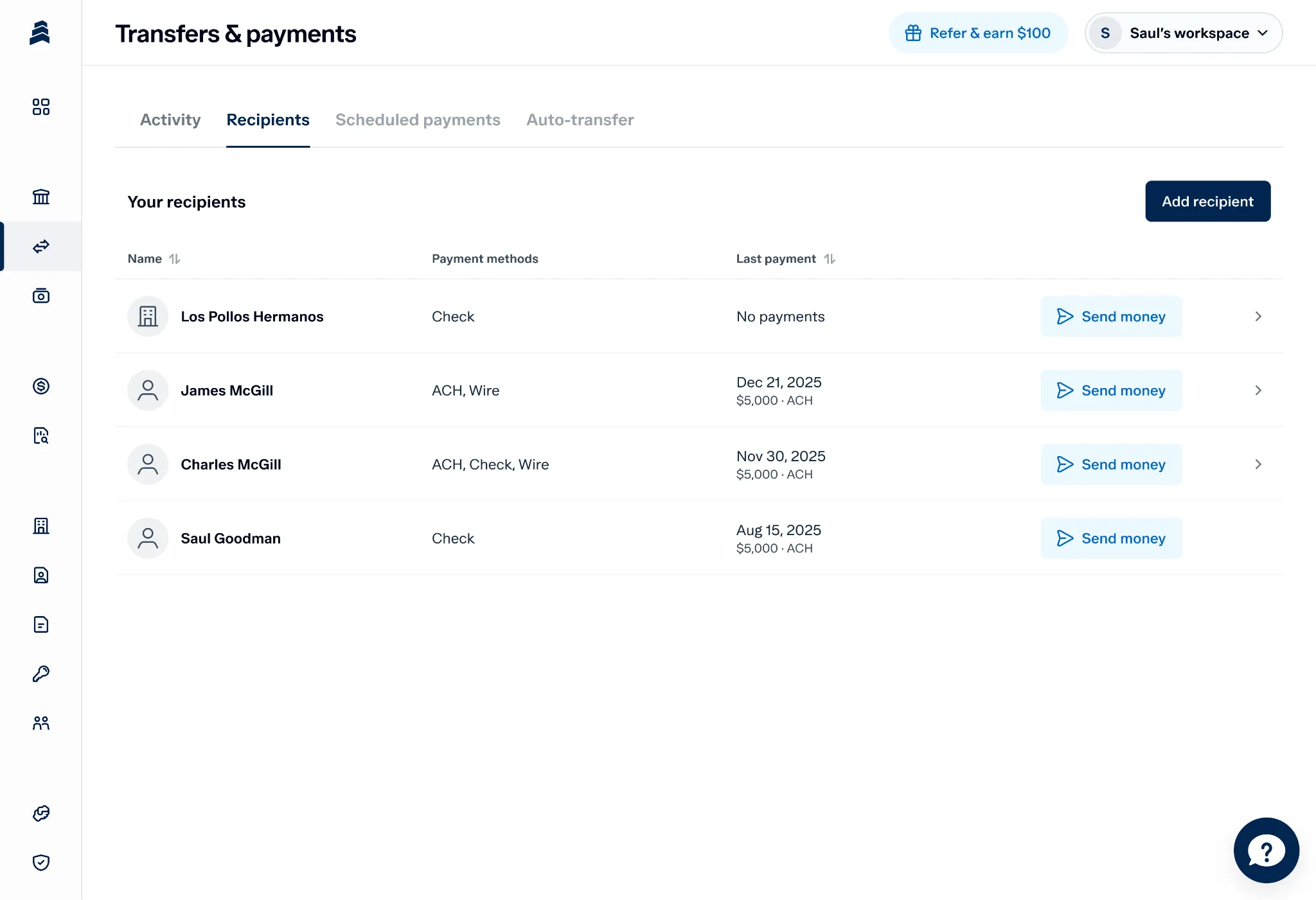
Store payment details for all your vendors and payees (like your handyman or property manager) in one place, so you can easily send money without re-entering account information every time.
Just select the recipient, choose the payment method, and you're done! Keep everyone in the loop by adding their email addresses to receive payment notifications.
Follow these steps to add a recipient:
- Click "Add Recipient": Find it under Transfers & Payments.
- Enter recipient details: Fill in the recipient's name, email (optional), and select individual or business.
- Choose payment method: Select ACH, wire, or check.
7. Schedule payments and transfers
Schedule transfers between accounts and payments via ACH, wire, or check (printed and mailed for you). You can even tag your transfers and payments to a property, saving you the extra steps of categorizing them later.
Whether it's paying your cohost, automatically transferring funds to your maintenance reserve, or making a one-time payment to a contractor, scheduling puts it all on autopilot, so your money is always where it needs to be.
How to schedule payments:
- Choose a Recipient: Click "Send Money" and choose an existing recipient or add a new one.
- Enter Payment Details: Add the amount, payment method and Baselane checking account.
- Select Dates: Schedule a one-time payment or choose a start and frequency (weekly or monthly) for recurring payments.
How to schedule Transfers:
- Select Accounts: Click "Move Money" then "Transfer Funds" and choose the source and destination accounts for the transfer.
- Enter Transfer Amount: Add the amount you want to transfer.
- Select Dates: Schedule a one-time transfer or choose the start date and frequency for recurring transfers.
.webp)
8. Attach receipts and invoices to transactions
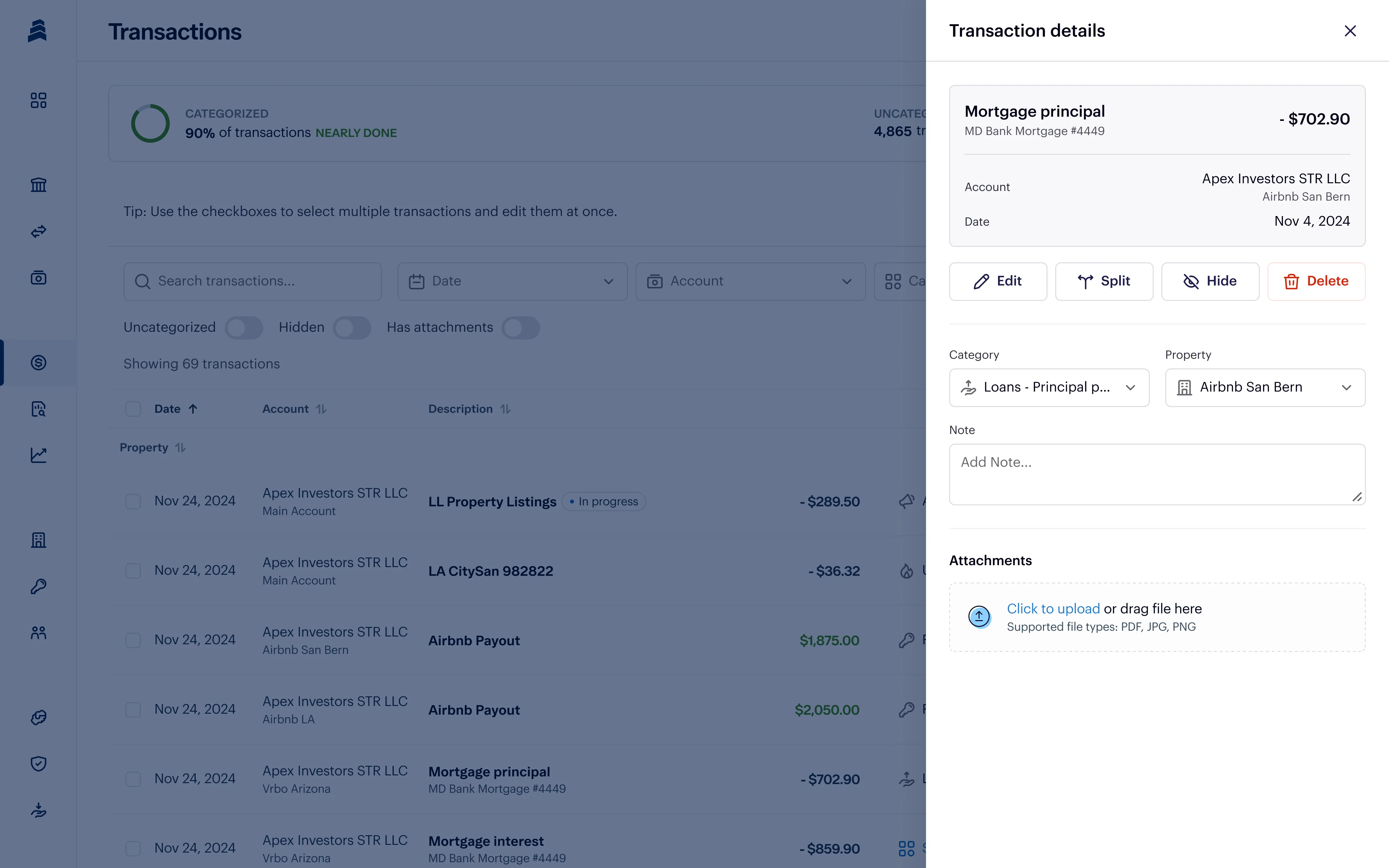
Saving your receipts and invoices helps maximize your Airbnb deductions and creates a clear paper trail for any potential IRS questions about your expenses. Instead of storing everything in a shoebox or desk drawer you never check, upload your receipts and invoices to Baselane. Attach them to individual transactions, or let Baselane’s AI do this automatically, for tax-ready financial records you can access anytime, anywhere.
How to attach receipts and invoices to transactions:
- Go to "Transactions": Find it under Baselane Banking.
- Select the Transaction: Click the arrow to the right of the transaction you want to attach a file to.
- Click "Add Attachments": You can either click to upload or drag and drop the file.
9. Analyze cash flow and performance
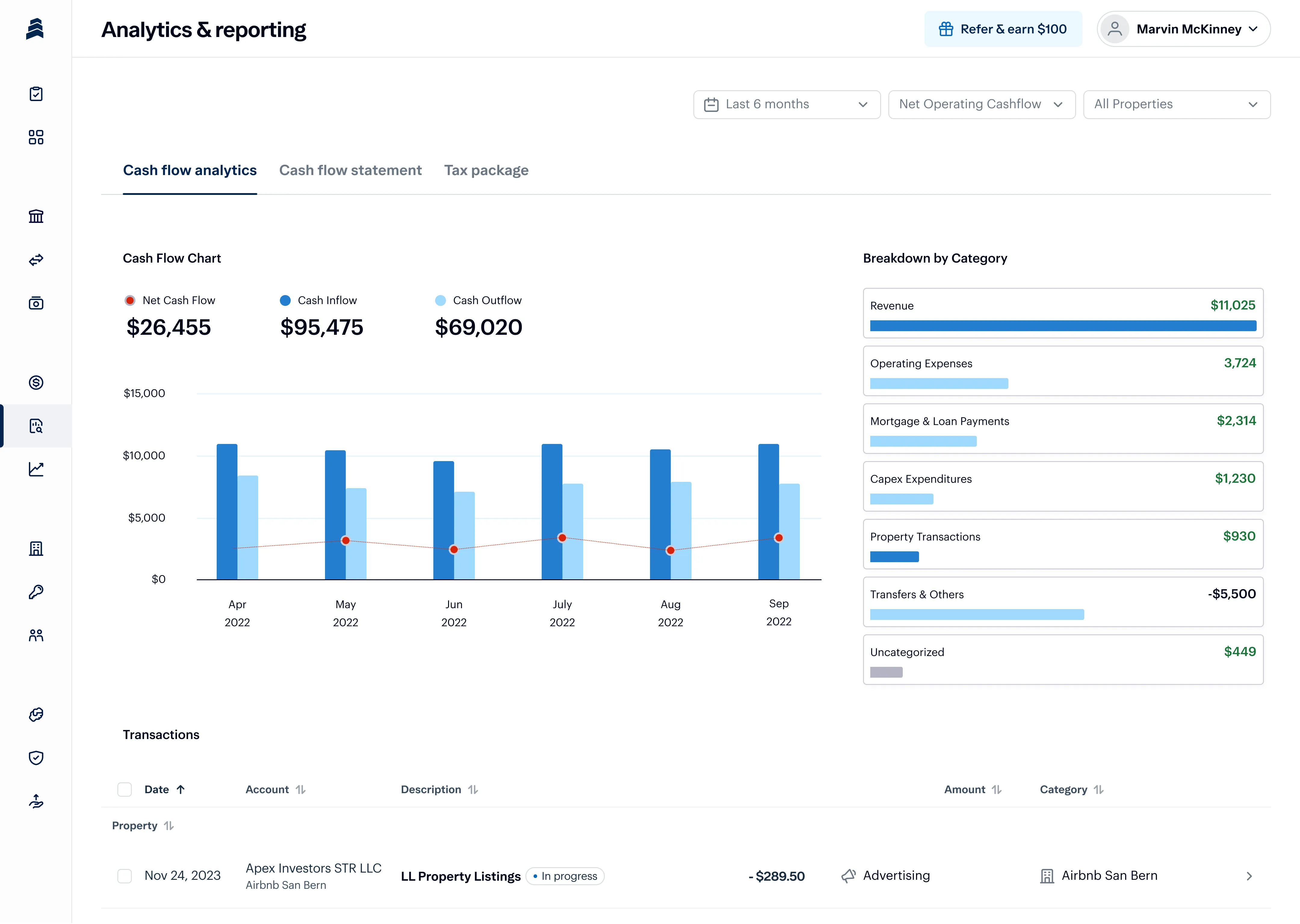
It's easy to lose sight of where your money is going when you're juggling multiple tools and spreadsheets to manage your short-term rental property. Baselane consolidates all your finances in one place and provides real-time cash flow insights to give you a clear picture of how each property is performing. Easily analyze income and expenses to decide when to adjust rental rates, cut spending, or expand your portfolio.
How to analyze cash flow:
- Choose Cash Flow View: Under Cash Flow Analytics, choose or create a custom cash flow view. Preset views include Net Operation Income (NIO), Net Operating Cash Flow, Total Inflows & Outflows and Schedule E Categories.
- Change Filters: Select a property (or multiple) and a date range.
- Analyze Data: Review charts and cash flow breakdowns, like total expenses or revenue, to understand your financial performance.
10. Auto-generate Schedule E reports and tax packages
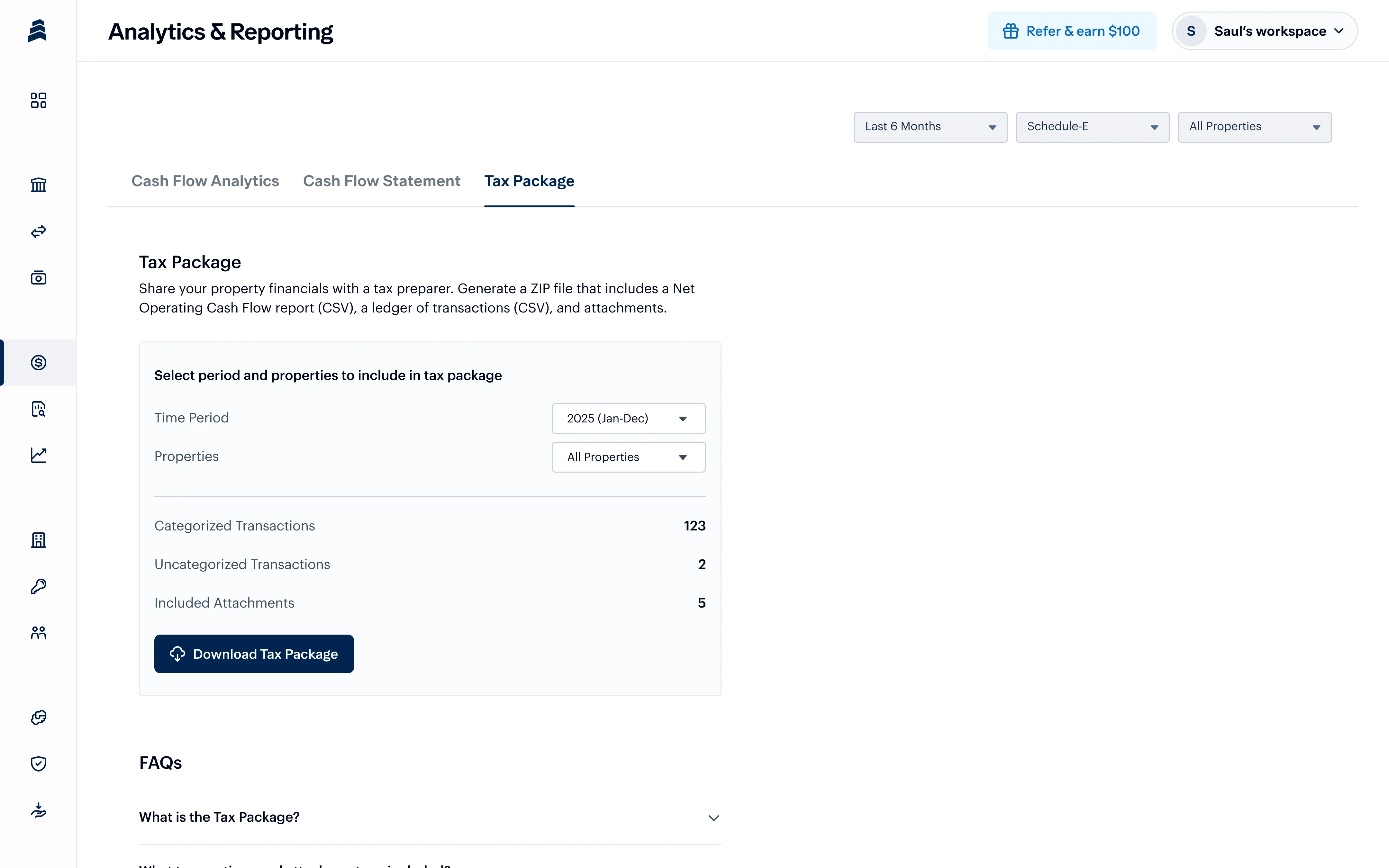
With Baselane's built-in accounting software for Airbnb, Vrbo, and short-term rentals, you can generate financial reports in minutes instead of hours. In a few clicks, you can access Income Statements, Net Cash Flow Statements, and other reports, plus download a detailed tax package that includes everything you need for short-term rental tax filing.
How to download your tax package:
- Click "Tax Package": Find it under Analytics and Reporting.
- Choose Reporting Period: Select the date range and properties to include in the report.
- Download Reports: Get your income statement, transaction ledger, and captured receipts.
Read this article for more details on filing Airbnb taxes: Complete Guide to Airbnb Accounting and Bookkeeping.
Spend less time tracking expenses
Let's be honest, you got into short-term rentals to earn some extra cash, not to spend hours filling in spreadsheets and chasing down receipts. With Baselane, you can ditch double-entry for all-in-one banking, bookkeeping, and rent collection built for real estate businesses.
Ready to automate your short-term rental accounting? Sign up for a free Baselane account today.
FAQs
Can you write off Airbnb expenses?
Yes, you can write off a range of Airbnb host expenses related to operating and maintaining your rental property. Deductible expenses include maintenance costs, utilities, insurance, property management fees, and more. These Airbnb write-offs help reduce your taxable income and can increase your overall profits.
Are Airbnb expenses tax deductible?
Airbnb expenses are typically tax-deductible if they are necessary for running your vacation rental business and maintaining your rental property. Examples of Airbnb deductible tax expenses include property maintenance, travel expenses, advertising costs, and even mortgage interest.
How to track Airbnb income and expenses?
To track Airbnb income and expenses, start by setting up a dedicated bank account for your rental property transactions. Record all income and expenses, including platform fees, cleaning, maintenance, and utilities. You can use spreadsheets or accounting software like Baselane to stay on top of your finances without all the manual data entry.
How to categorize Airbnb rental expenses?
Airbnb company expenses generally fall into two categories: Direct (costs for operating and Airbnb) and indirect (costs for owning a rental property). Within these, the IRS Schedule E form breaks expenses down further into 15 categories, such as advertising, repairs and supplies.
How to calculate Airbnb expenses?
Calculating Airbnb expenses requires a detailed breakdown of all costs associated with running and owning your short-term rental. As an Airbnb host, you can write off some or all of the allowable expenses for operating an Airbnb (e.g., cleaning fees), depending on what part of your property is rented out and for how long. Expenses related to owning the property are fully deductible, like mortgage interest and property taxes.
How to report Airbnb rental income and expenses?
To report Airbnb rental income and expenses, you’ll need to file a Schedule C or Schedule E (Form 1040) with the IRS. Airbnb may send Form 1099-K, depending on how many reservations or payments you receive in a calendar. Under the One Big Beautiful Bill Act and IRS, Airbnb only has to issue a Form 1099-K if total gross payments exceed $20,000 and more than 200 transactions in the calendar year.
What expenses can I claim on my Airbnb?
Generally, every dollar you spend on your Airbnb business and properties is a dollar you don’t have to pay on your rental income. The IRS will ask for records when you file your taxes, so make sure you keep receipts and put monthly expenses in the right categories. Baselane's automated accounting can do all the work for you, so when tax season rolls around, your Schedule E is ready in just one click.