
.webp)


If you’re still using QuickBooks to manage rental properties, think twice.
While it’s a go-to accounting software for landlords and CPAs, it isn’t designed for real estate. You need to rely on workarounds to adapt it to the realities of managing multiple properties, which turns out to be time-consuming and costly.
In this article, we’ll discuss where QuickBooks shines and where it stands back and share alternatives to manage your portfolio with ease.
Key takeaways
- QuickBooks remains widely used by landlords but is not built for real estate, requiring workarounds like Classes, Locations, and sub-customers to track properties and units.
- QuickBooks struggles with multi-unit portfolios due to manual tagging, a lack of native rent collection, tenant management, and property-level banking.
- Multi-property landlords should consider alternatives like dedicated property management solutions or landlord-focused integrated banking platforms.
- Baselane is the best QuickBooks alternative, offering automated property-level bookkeeping, banking, rent collection, tenant management, and real estate-specific reporting, making it a superior choice for multi-unit landlords.
QuickBooks Desktop vs Online
QuickBooks offers a desktop version and a cloud-based version. Here’s how each of these differs.
QuickBooks Desktop
Many landlords and CPAs rely on QuickBooks Desktop for its robust reporting and customization. Historically, the desktop was the preferred choice for complex accounting setups, including multi-entity or multi-property tracking.
But the desktop version has been phasing out. New subscriptions are no longer available, and support for existing versions (Desktop 2023 and 2024) is expected to end between May 2026 - 2027.
This means QuickBooks Desktop is no longer a long-term solution—it’s a legacy system that requires an exit plan.
QuickBooks Online (QBO)
QBO has become the standard platform for landlords managing multiple properties. It offers real-time access, automated bank feeds, and easy collaboration with accountants—features that align well with modern property management operations.
That said, QBO has its limitations. When your portfolio grows beyond a handful of properties, you need to rely on higher-tier plans to replicate basic property-level reporting using features like Classes and Locations.
Most investors use at least QBO’s Essentials or Plus plans, with Plus being the most common choice due to its support for property-level tracking workarounds. These configurations can be effective but introduce complexity, manual setup, and additional costs that become more apparent as portfolios grow.
The bottom line is that QuickBooks is still used for property management. The question is how well it works as your portfolio grows. In the following section, we’ll discuss the QBO’s pros and cons in detail.
The pros of using QuickBooks for property management
QuickBooks for rental property management is used due to its strong accounting features and offers many benefits to landlords.
Multi-property tracking via Classes/Locations
QuickBooks allows you to approximate property- and unit-level tracking by using Classes and Locations. When configured correctly, this setup enables property-level profit and loss reporting without creating separate company files for each property.
This setup works when you manage a handful of properties, as it allows you to view cash flow by property, roll up performance at the portfolio level, and maintain one central chart of accounts.
Powerful reporting for taxes and owners
QuickBooks stands out in traditional accounting reports, which is a major reason many landlords and CPAs rely on it for tax preparation. You benefit from:
- Customizable P&L statements by property or class
- Balance sheets that support entity-level accounting
- Schedule E–ready reports for rental income
- Built-in 1099 tracking for vendors and contractors
Accountant and CPA familiarity
Most CPAs, bookkeepers, and tax professionals already work in QuickBooks. When you work with outside professionals—or plan to eventually hand off bookkeeping—this familiarity can save time, as you can hand over your bookkeeping to your CPA.
Automatic bank feeds and reconciliations
QuickBooks connects directly to multiple bank and credit card accounts, making it easier to manage complex cash flows across properties. If you already have an organized bank account set up, QBO can pull in income and expenses, reducing manual data entry. It helps ensure that rent deposits, mortgage payments, and vendor expenses are consistently captured.
The cons of using QuickBooks for property management
Property management in QuickBooks requires manual workarounds to handle rental-specific accounting, turning routine property management tasks into time-consuming, error-prone processes.
Not designed for real estate
To make QuickBooks work for real estate, you have to adapt its accounting-oriented features—using Classes or Locations to represent properties and units, and setting up tenants as customers to track rent payments.
While this approach can function on the surface, it’s far from intuitive.
Unlike landlord accounting software that natively understands properties and units, QuickBooks relies on manual structure and consistency. You need to categorize eerie translation correctly to maintain accurate property-level reporting. A single missed or incorrect tag can throw off an entire property’s finances.
The problem is compounded by the way QuickBooks stores data. All activity lives in a general ledger rather than a true property ledger, making it difficult to generate clean property-level cash flow statements and performance metrics.
Compare the best accounting software for house flippers and the best accounting software for sole proprietors to find the right fit for your business structure.
Cumbersome multi-property setup
Managing multiple rental units requires creating workarounds, such as adding each property as a “customer” or “class,” and each tenant as a “sub-customer.” This structure breaks down as the number of units increases, making it difficult to generate clean, property-level profit-and-loss statements or to organize expense categories efficiently.
Steep learning curve and hidden time costs
QuickBooks relies heavily on accounting terminology and processes, making you spend hours learning the system, rely on accountants or bookkeepers for ongoing maintenance, or make one-off “fixes” that create long-term reporting issues. This time cost compounds over time and often outweighs the perceived savings of using general accounting software.
Pricing scales poorly for larger portfolios
The cost of QuickBooks grows with each property or user added. You’ll often need higher-tier plans ($88/mo but $220/mo after the promotion period ends) to get workflow automation, advanced reporting, and custom fields, even though those plans still do not offer the rental properties accounting you need. Compared to dedicated property management software, QuickBooks is more expensive and less efficient for multi-unit use.
To compensate for missing property management features, you need third-party apps for rent collection, maintenance tracking, or document storage. These integrations incur monthly costs and don’t always sync seamlessly, leading to data inconsistencies or duplicate entries.
When should you consider QuickBooks alternatives for multi-property management
Look for alternatives to QuickBooks if you encounter any of the following situations:
- Managing more than five properties or units
- Struggling to maintain accurate property-level reporting
- Spending excessive time on manual rent collection or transaction tagging
- Needing real-time insights across multiple properties
- Facing high bookkeeping or professional service costs to maintain their current setup
- Wanting tenant-facing tools like portals, automated rent reminders, or maintenance tracking
For a broader look at your options, explore the best real estate accounting software on the market or see how AI-based accounting software is transforming portfolio-level bookkeeping.
Top alternatives to QuickBooks for property management
For most landlords, the ideal solution combines the accounting rigor of the best QuickBooks alternatives with the operational ease of property management software.
Property management software
Property management software platforms handle the end-to-end lifecycle—from buying the property to renting it. Many of these also offer accounting and banking tools, but they might not be as robust.
Some of the top alternatives include:
- Stessa: Great for portfolio tracking and real estate investment accounting. Offers property-level reporting and financial insights, but lacks integrated banking features.
- AppFolio / Buildium: Ideal for larger portfolios (50+ units). Offers tenant portals, lease management, and comprehensive reporting. Can be expensive and overly complex for independent landlords.
- Rentec Direct: Suitable for mid-sized portfolios needing tenant screening and portal access. Strong property management features, but limited financial automation.
While these platforms excel at property management tasks, they often fall short when it comes to managing finances across multiple properties.
Integrated banking and bookkeeping solution: Baselane
Baselane fills the gaps with its landlord-focused integrated banking and bookkeeping. Unlike QuickBooks or property management software, it helps you manage the finances across all your properties.
Own your time,
not just your properties
Make your finances work harder, so you don’t have to.


Why Baselane is a better alternative to QuickBooks
Here’s why Baselane wins over QuickBooks:
Automate property-level bookkeeping
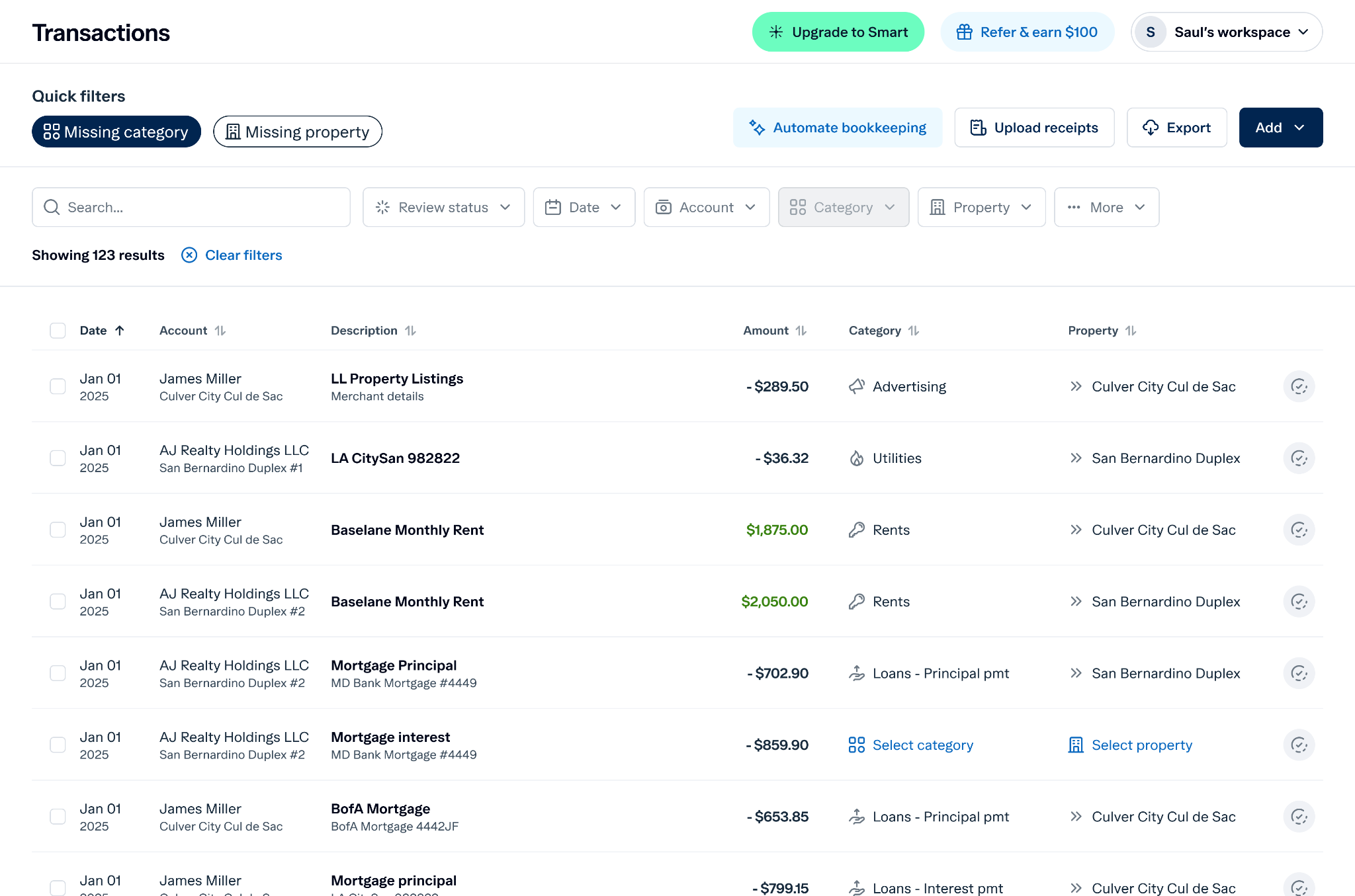
Manually tagging every transaction in QuickBooks is time-consuming and error-prone. Baselane automatically categorizes every transaction by property, unit, and Schedule E category. This ensures your books are always accurate, reduces errors, and saves hours of bookkeeping every month.
Consolidate banking across properties
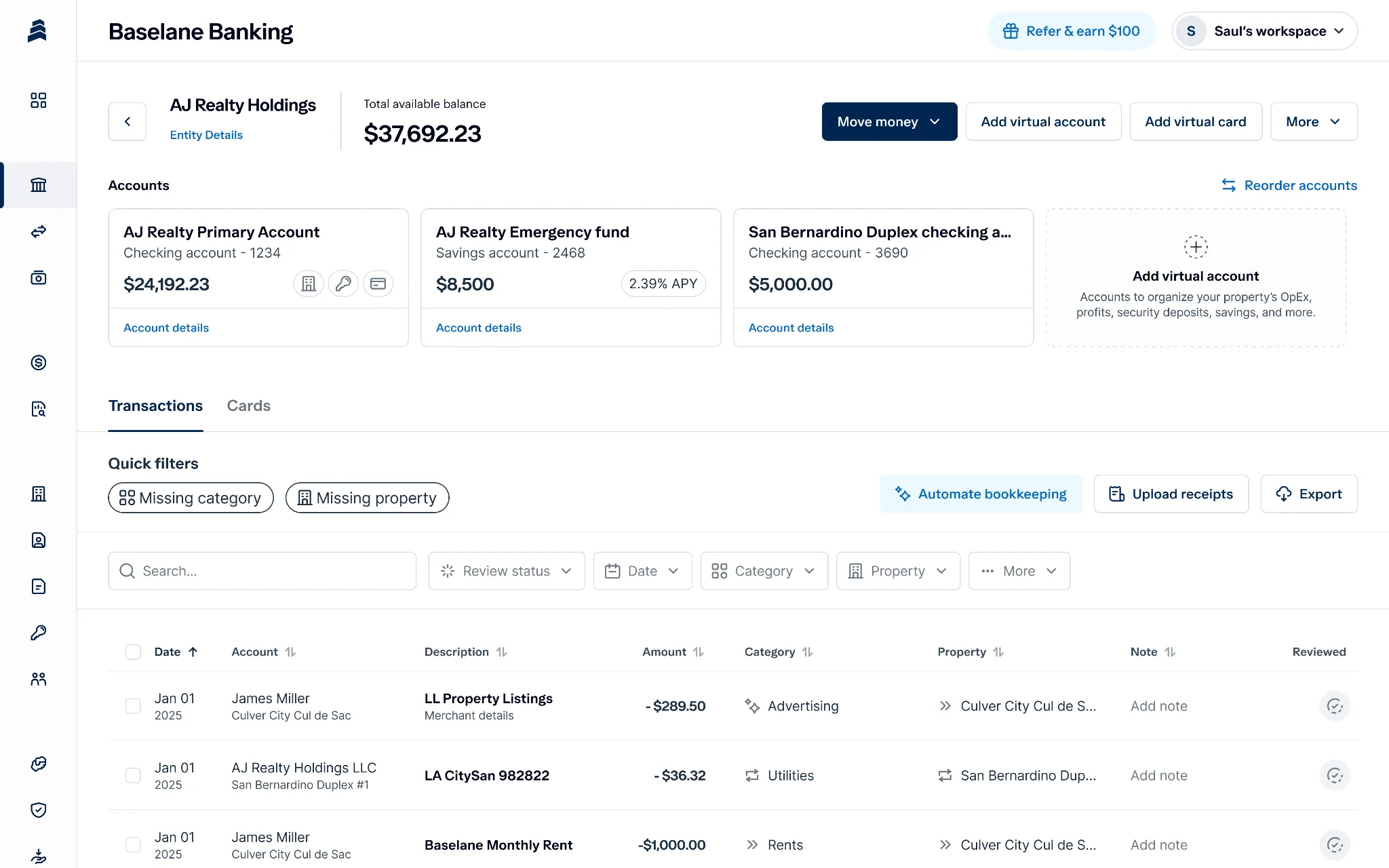
QuickBooks doesn’t offer integrated banking, as it pulls in transaction info from your bank accounts
Baselane offers built-in banking, allowing you to open unlimited checking or savings accounts tied directly to properties or units. You can move money between accounts, schedule automatic transfers, and see real-time balances for each property. Property-level banking gives you much-needed structure to manage finances as your portfolio scales.
Collect rent efficiently
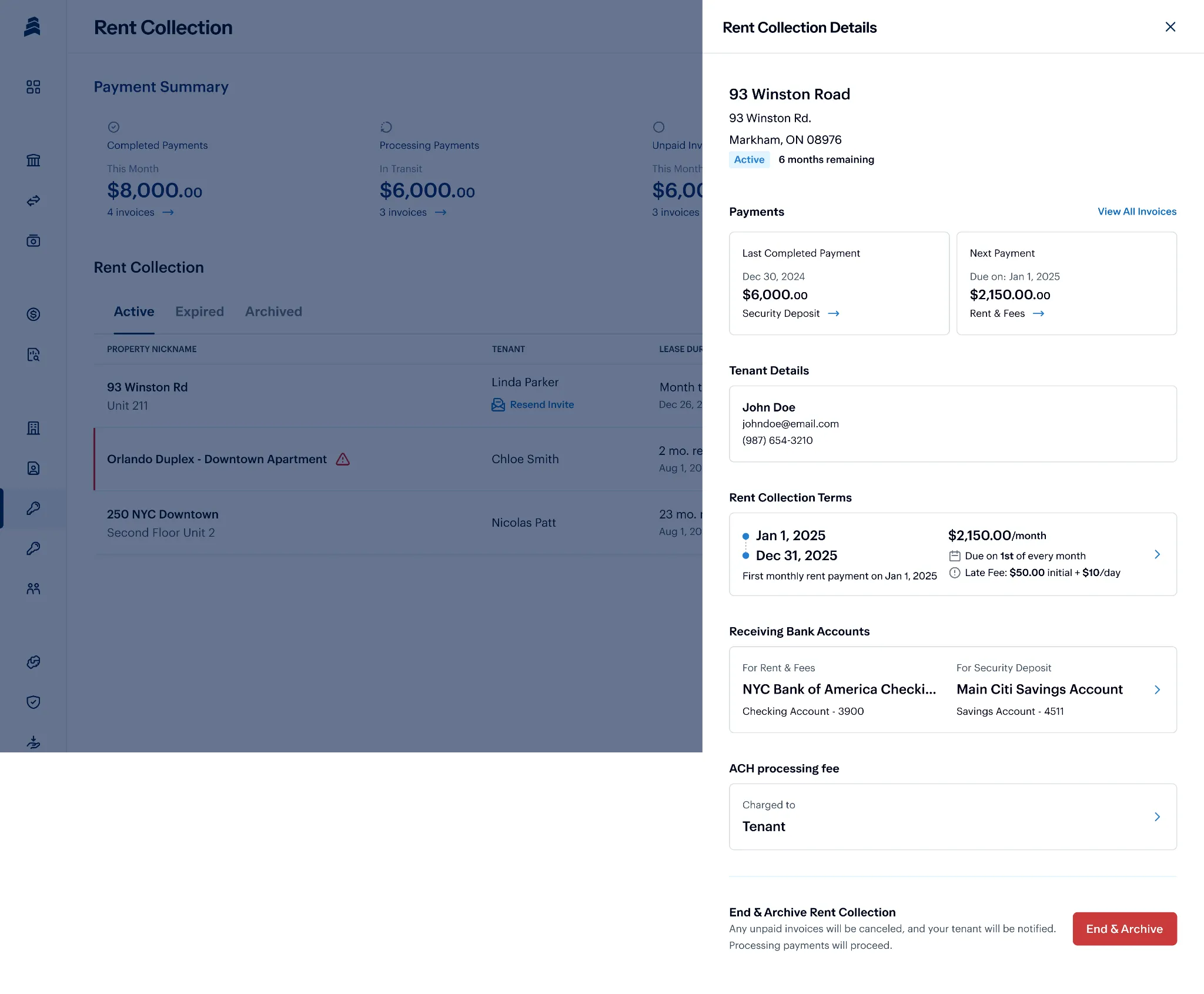
With Baselane’s native rent collection, you can send invoices to tenants, accept payments (ACH, cards, wire), charge late fees, and prorate rent. Due to native bookkeeping and banking, all these payments are automatically recorded and categorized, reducing errors and the money you would spend setting up third-party tools in QuickBooks.
Generate real estate-specific reports instantly
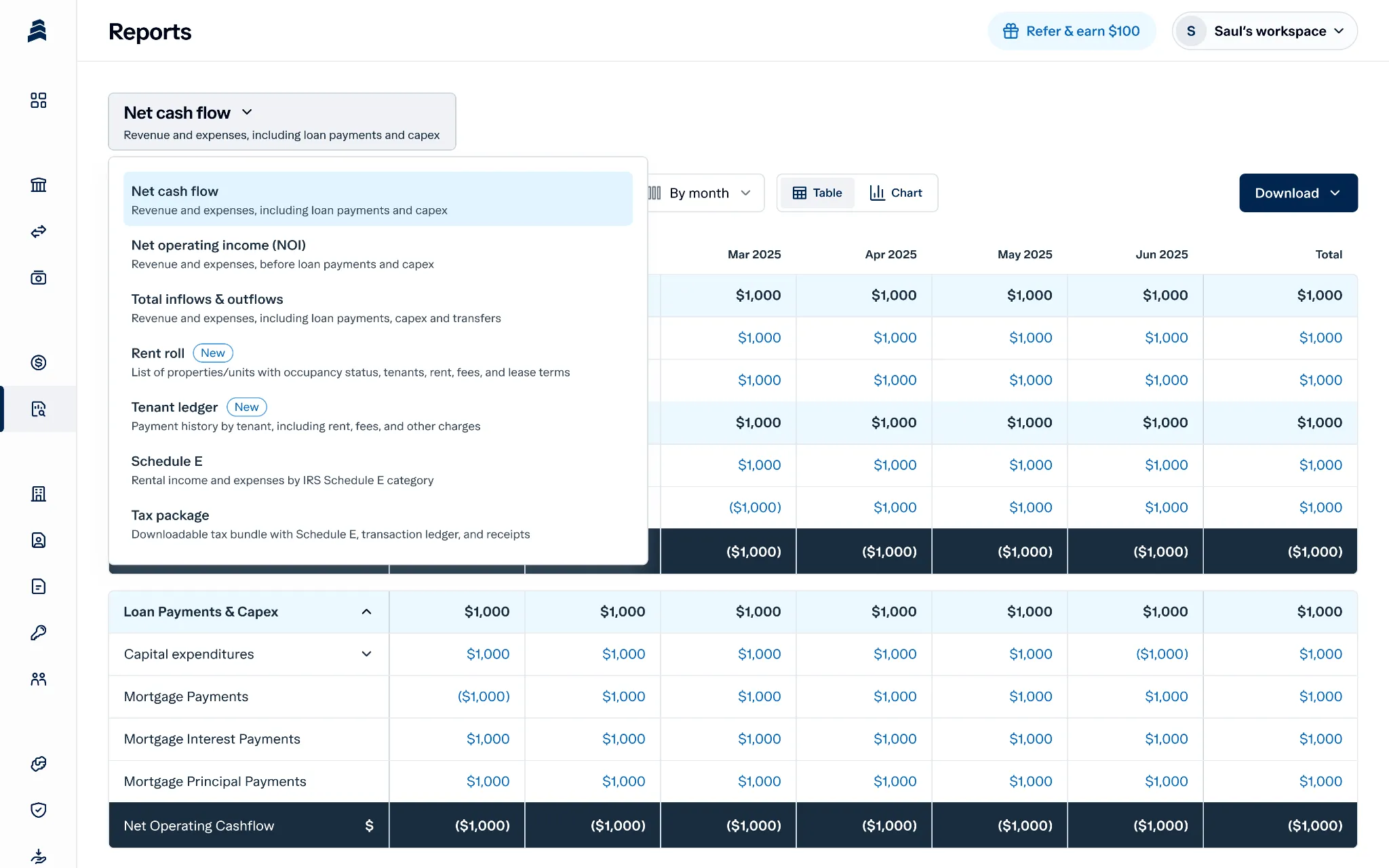
QuickBooks provides generic accounting reports that require extensive setup and manual adjustments to generate property-level insights. Baselane offers real-time reports: income statements, cash flow, P&L by property, and tax packages. You can export these reports and share them with your CPA, which saves both of you hours during the tax season.
Comparison table: Baselane vs QuickBooks
Stop trying to fit your portfolio in a software that wasn’t built for it. Get financial clarity and time freedom by opening your Baselane account today!
FAQs
Can QuickBooks automate rent collection?
No, QuickBooks for rental property management doesn’t have a tenant portal for autopay enrollment, lease enforcement, or automatic late fee calculations. If you’re using QuickBooks rental management, you need to rely on third-party tools or switch to property rental management software.
What are the biggest accounting challenges landlords face with QuickBooks?
Landlords using QuickBooks for property management accounting or QuickBooks real estate property management face challenges like a lack of multi-unit accounting support, high pricing, and a lack of rental reports.
Is QuickBooks different for short-term rental accounting?
Yes. For short-term rentals like Airbnb, property management using QuickBooks or QuickBooks for property management setup often requires separate line items for occupancy taxes and platform fees, which can clutter a standard QuickBooks setup. Read more about it in our accounting for Airbnb guides, understand vacation rental income tax rules, and find vacation rental management apps.
What are the best QuickBooks property management software alternatives?
Landlords looking for QuickBooks real estate management software alternatives often switch to Baselane for integrated banking, rent collection, and reporting. It’s also one of the easiest to use and most affordable banking solutions, regardless of your portfolio size.



.webp)